As an Amazon Associate, Dijipedya earns from qualifying purchases. Product descriptions were checked on 29 October 2026. This is a listing-based comparison, not a hands-on test. Prices, sellers and delivery options can change. Cover image: original AI-generated illustration, not a photograph of the recommended products.
Choose a coding robot by what the child can change
The best coding robot for a child is one that lets them create instructions, see the result and change those instructions when something goes wrong. A robot that dances after one button press can be entertaining, but it does not automatically offer that learning loop. Before comparing shapes, ask what the child will actually program.
This guide compares four different starting points: Learning Resources Coding Critters, Wonder Workshop Dash, Thames & Kosmos Kai and Petoi Bittle X. They range from screen-free movement sequences to app-based programming, training inputs and more technical robot development. Those are different experiences, so a single winner would hide the most important buying decision.
If you are still choosing between a coding toy and a playful companion, start with our robot pets and companion robots guide. This article focuses on children learning through a consumer robot at home. Our education and research robots guide covers the different equipment needs of schools, universities and laboratories.
1. Coding Critters: start with screen-free sequences
Learning Resources Coding Critters Scamper and Sneaker is a kitten-themed set in which the main robot follows directions entered using buttons. The smaller kitten and playset provide story situations for those routes. The product listing describes a 22-piece set. The child can plan a path, enter instructions and watch whether the robot reaches the intended spot.
That is a useful distinction from continuous remote driving. Instead of correcting the direction every second, the child makes a plan first. A simple activity is to count the movements needed to reach Sneaker, enter them and compare the outcome with the original plan. If the route fails, change the sequence rather than moving the destination to make it look successful.
Choose this style for a learner who enjoys little stories and physical play. It provides a concrete introduction to ordered actions without requiring a tablet. It is not a substitute for every later programming concept, and it should not be described as teaching Python, variables or advanced robotics simply because it uses the word coding.
Check the current age label, battery requirements and included scenery before buying. A family also needs a place to keep the small parts together. This is the most accessible direction in the comparison for a child who is interested in arranging a scene but not yet comfortable navigating software menus. Age alone is less informative than the combination of the packaging guidance and the child’s ability to follow the activity.
2. Wonder Workshop Dash: for app-based robot activities
Dash moves the experience toward programming through compatible software. The robot is an established consumer education format with movement and expressive features, and its main distinction here is the app-based approach. Instead of buying it only as a character with sounds, evaluate the current apps, their compatibility and the activities available for the particular device your child will use.
A tablet or phone requirement changes the practical purchase. Check the supported operating-system version, whether the intended app can still be installed and whether an account or paid content is required. A robot listing and an old video tutorial may refer to different generations of software. Confirm those details before promising that a specific lesson will work on an existing family device.
For a first activity, let the child make the robot follow a simple route and then modify one part of it. Add a clear goal such as returning to a starting point. Once the basic connection works, gradually introduce more complicated instructions supported by the current app. It is better to complete a small working project than to spend the first session exploring every available menu.
Dash is the direction to consider when the child wants software-based activities and the family is willing to manage a compatible device. It is less suitable if the main buying goal is avoiding screens entirely. Check the exact bundle, because educational accessories and classroom packs should not be assumed to come with the basic robot.
3. Thames & Kosmos Kai: build and train a six-legged robot
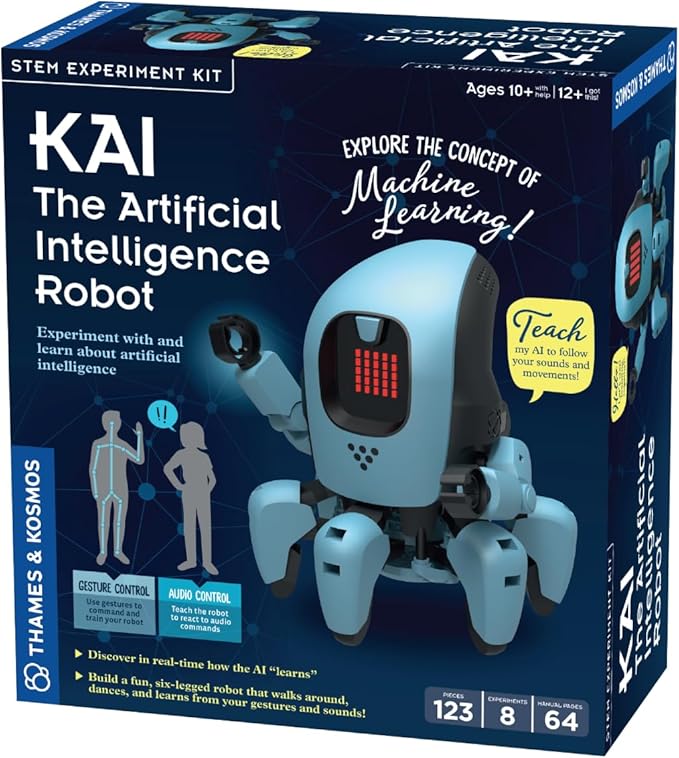
Kai combines construction with an introduction to machine learning. The manufacturer listing describes a six-legged robot whose movements can be assigned to gestures and sounds through an included app. The child builds the machine, then works with examples of inputs that trigger functions such as walking, turning and stopping.
This is not the same activity as writing a long route or developing a general-purpose chatbot. Training a gesture gives the learner a way to explore how a system associates examples with actions. If two inputs are too similar, the interesting question becomes how to provide clearer examples. That makes Kai a distinct choice for a child curious about how recognition works.
The listing recommends ages ten and up with adult help, or twelve and up for independent play. Those are useful expectations to preserve rather than replacing them with a broad marketing age range. Assembly, app setup and training all take attention. A parent should plan the first session around getting the hardware built correctly before expecting a polished demonstration.
Choose Kai when building and experimenting are part of the gift. If the child simply wants to open a box and immediately drive a robot, an assembly project may create the wrong expectation. Check device compatibility and the included manual before purchase. Also distinguish the robot’s training activities from an unsupported promise that it will autonomously learn anything the child asks.
4. Petoi Bittle X: a longer technical path
Petoi Bittle X is a small legged robot dog rather than a wheeled character. The Amazon version linked here is pre-assembled and includes a sensor pack. Its listing describes remote, app and voice control, more than 35 predefined actions and programming options that include Petoi Coding Blocks, C++ and Python. It uses the open-source OpenCat platform.
The appeal is the opportunity to progress beyond operating preset movements. A learner can start by observing how a walking sequence behaves, then explore the programming tools available for the model. That makes it a more technical choice for an older child or teenager working with an interested adult. The physical robot is part of the experiment, so care, charging and troubleshooting remain part of ownership.
Read the bundle contents carefully. The listing discusses an optional intelligent camera module, which should not be mistaken for a camera included with every sensor pack. A product’s compatibility with additional modules does not mean those modules are already fitted. Check the exact board, accessories and software instructions for the bundle being sold.
Bittle X is most appropriate when the buyer wants an expandable programming project and accepts a steeper setup path. It is not a soft companion or a simple preschool toy. For a child whose main interest is a puppy that barks, our robot dog toys guide is a better starting point. For an enthusiastic learner who wants to investigate legged movement, Bittle offers a more relevant direction than a decorative dancing robot.
Compare the learning methods before the price
Coding Critters uses physical button sequences. Dash introduces a compatible app as the main activity surface. Kai combines building with training gestures and sounds. Bittle X offers a more technical path through robotics software and programming tools. These differences should determine the shortlist before colors, character design or an advertised discount.
A kit is not automatically more educational than a pre-assembled robot. Building can teach a child how parts fit together, but it also adds work before the first program runs. A ready-built robot can get the learner to experimentation sooner. Decide whether construction is an intended part of the project or a barrier the family would rather avoid.
Similarly, voice control is not evidence of coding depth. A product can respond to spoken commands while offering very little ability to create new behavior. Look for documentation showing how the user edits instructions. The most useful evidence is a clear activity or manual, not the presence of words such as smart, AI or STEM in a marketplace title.
A practical buying checklist for parents
Begin with the manufacturer’s age guidance and then assess the required adult involvement. Some children are comfortable following a detailed build manual; others need help with each stage. The correct choice is one the household can support. Treat the advertised learning benefits as possibilities, not a guaranteed outcome from simply owning the toy.
Check the entire device chain. That includes the robot, any controller, the app, the operating system and the connection method. If a laptop or tablet is required, confirm it before the gift arrives. Also review account requirements, current subscriptions, optional courses and whether basic functions remain usable without paid extras.
Power and spare parts matter for repeated use. Find out how the robot charges, whether the remote needs separate batteries and which accessories can be replaced. For a construction kit, keep the manual and remaining parts in a labeled container. Losing one small connector should not require identifying the entire kit from a photograph months later.
For an Amazon purchase, compare the exact model and seller. A listing can contain several variations with different components. Review delivery options and return terms for the destination country. This guide uses Amazon.com links, but does not promise that every current seller ships internationally or that a particular offer will remain available.
Plan the first three sessions
In the first session, aim for one reliable action. Charge the robot, complete the required connection and make a short instruction run successfully. Avoid adding every optional accessory at once. A small success helps the child understand which part of the system is working and makes later troubleshooting easier.
In the second session, set a task with an observable outcome. It might be reaching a floor marker, reacting to a chosen gesture or performing a short movement sequence. Ask the child to predict what will happen before pressing run. If the result differs, change one instruction or one input example and try again.
In the third session, let the child invent a variation. Perhaps the route becomes a delivery game or the trained gesture becomes part of a performance. The goal is ownership of the activity. Keep the challenge within the documented capabilities of the robot rather than suggesting it can gain functions the hardware and software do not support.
Frequently asked questions
Which is best without a screen? Coding Critters is the screen-free option in this comparison. Confirm the exact model because product families can contain different control methods.
Which lets children build the robot? Kai is explicitly a construction project. The Bittle X listing here is the pre-assembled version, so it should not be sold to the reader as the same build experience.
Does an AI robot teach coding automatically? No. Training examples, writing instructions and talking to a chatbot are separate activities. Evaluate the actual project the child will complete.
Should I buy the most advanced kit? Buy for the next achievable project. An expandable robot can be valuable, but unused complexity does not improve the experience. A simpler robot with clear activities may be the better first purchase.
Are the recommendations based on hands-on tests? No. This is a buying comparison based on the cited product descriptions. We have not measured durability, learning outcomes or battery runtime, and we do not assign invented test scores.
Compare the options
| Product | Listed interaction | Who to consider it for |
|---|---|---|
| Coding Critters Scamper and Sneaker | Buttons and sequences | Screen-free starting point |
| Wonder Workshop Dash | Compatible app activities | Software-based projects |
| Thames & Kosmos Kai | Build and train gesture/sound inputs | 10+ with help;12+ independently |
| Petoi Bittle X Sensor Pack | Blocks, C++ and Python options | Technical projects |
Amazon product links and images
Coding Critters Scamper and Sneaker

Wonder Workshop Dash

Related guides
Robot pets and companion robots: the parent buying guide
Sources and research notes
Source: Amazon.com product descriptions linked above; accessed 29 October 2026. Product statements describe listed functions, not independently measured performance. We omit changing prices and star ratings.