Shopify takes care of the SEO basics on its own: sitemaps, canonical tags, SSL and mobile-friendly themes. What it does not do well is the slow, repetitive work: compressing hundreds of images, writing alt text, adding product structured data, fixing broken links and bulk-editing meta tags. That is where an SEO app pays off.
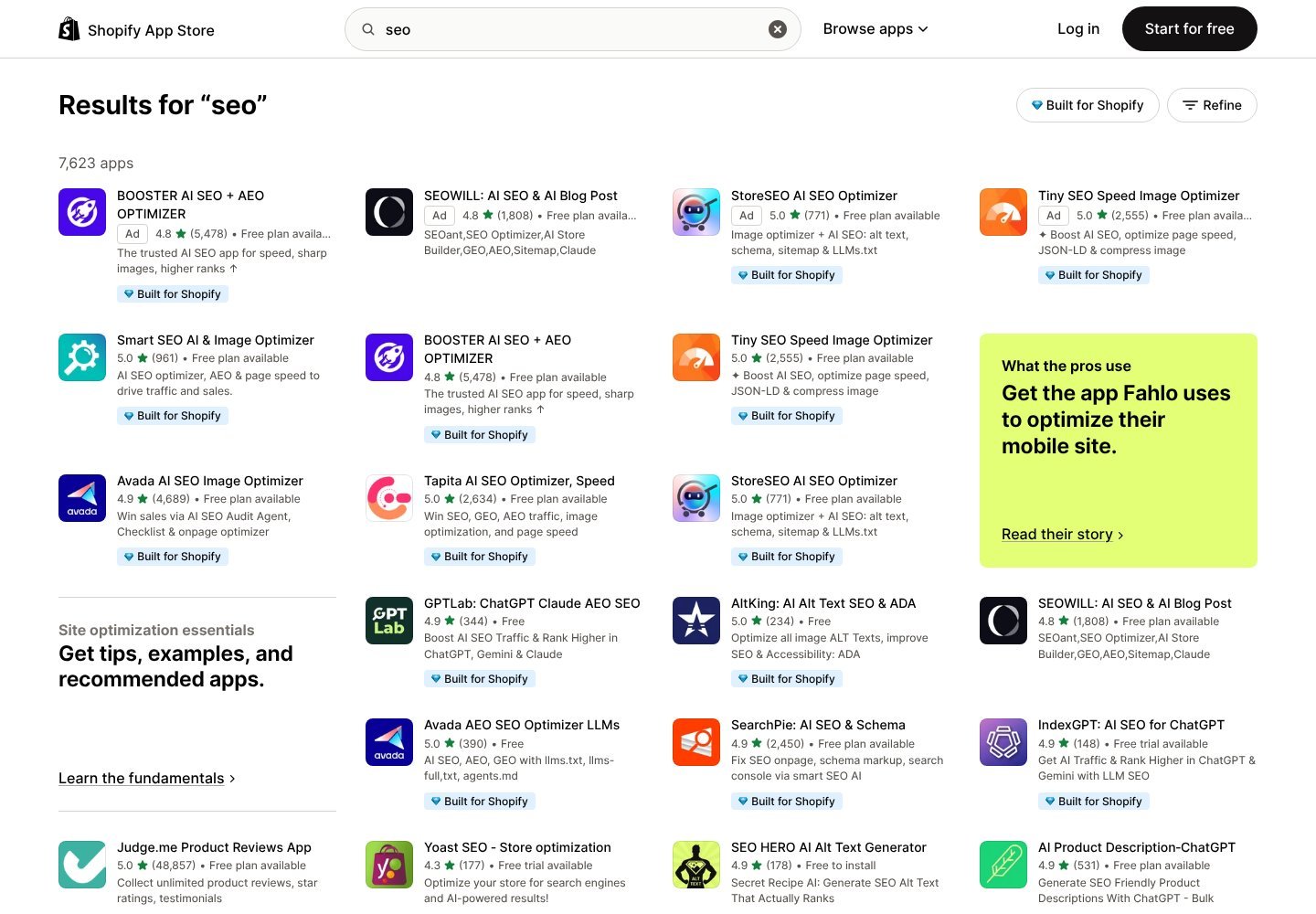
Searching “seo” in the Shopify App Store returns more than 7,000 results. Below are the apps that stand out by rating, number of reviews and feature set in October 2026, plus how to pick one without slowing your store down.
Contents
What an SEO app should do
- Compress and resize images to improve page speed
- Generate alt text for product images
- Add structured data (JSON-LD) so Google can show prices, stock and reviews
- Find and redirect broken links
- Bulk-edit meta titles and descriptions
- Newer: prepare your store for AI search with llms.txt and richer schema
Best SEO apps for Shopify
1Booster AI SEO + AEO Optimizer
An all-in-one app with automatic image optimization, meta tag templates, broken link fixes and AI-written alt text. 4.8 stars from about 5,500 reviews; free plan available. A good pick if you want one app to handle most tasks.
2Avada AI SEO Image Optimizer
Combines an SEO audit checklist with on-page fixes, image compression and structured data. 4.9 stars from about 4,700 reviews; free plan available. Avada also offers a separate free app focused on AI answer engines.
3Tiny SEO Speed Image Optimizer (TinyIMG)
Best known for image compression and page speed, plus JSON-LD structured data. 5.0 stars from about 2,550 reviews; free plan available. Choose it if your store is image-heavy and slow.
4Tapita AI SEO Optimizer
SEO, page speed and image optimization with support for multi-language stores and AI search visibility. 5.0 stars from about 2,600 reviews; free plan available.
5SearchPie: AI SEO & Schema
Covers on-page fixes, schema markup and Google Search Console integration. 4.9 stars from about 2,450 reviews; free plan available.
6Smart SEO AI & Image Optimizer
Generates meta tags and alt text automatically and adds structured data with a light footprint. 5.0 stars from about 960 reviews; free plan available.
7StoreSEO AI SEO Optimizer
AI-generated alt text, schema, sitemap tools and llms.txt support. 5.0 stars from about 770 reviews; free plan available.
8Yoast SEO for Shopify
The Shopify version of the well-known WordPress plugin, with content analysis while you write product pages and blog posts. 4.3 stars from about 180 reviews; free trial, then paid.
Product reviews also help SEO by adding fresh content and star ratings in search results. Judge.me is the most-reviewed option, with 5.0 stars from more than 48,000 reviews and a free plan.
How to do keyword research for an ecommerce website
Start by matching each search to the page a shopper expects. Someone searching “women’s waterproof hiking boots size 8” probably wants a product or collection page. Someone searching “how to clean waterproof hiking boots” wants an instructional article. A store that sends both visitors to the same generic product grid misses the difference in search intent.
- List your actual products and buyer questions. Use product categories, materials, customer support questions, and common comparisons as seed terms. Avoid inventing keywords just because they contain “best.”
- Check demand and difficulty. Use a research tool to compare monthly search volume, difficulty, and intent in your target country. A modest-volume term closely tied to a product can be more useful than a broad phrase that attracts unrelated visitors.
- Inspect the results page. If Google primarily shows stores and product collections, evaluate a collection page. If it shows tutorials and buying guides, plan an article that answers the question honestly.
- Map one main intent to each URL. Give the homepage, collections, product pages, and blog articles distinct jobs. Do not repeat the same target phrase mechanically in every title, image alt text, and description.
Check which keywords competing stores already rank for
After choosing the right keywords for your website, examine stores that sell comparable products. Semrush’s Organic Rankings report shows estimated ranking keywords for a competing domain; Keyword Gap can highlight relevant phrases they rank for but your site does not. Focus on queries your inventory and expertise can genuinely satisfy. For example, a shop selling refillable notebooks should not target a competitor’s leather planner category if it cannot fulfill that search. See our Semrush SEO Toolkit walkthrough for the step-by-step competitor keyword workflow.
Finally, compare your proposed topics with Google Search Console. It reports the impressions and clicks your own site actually receives, while competitor tools estimate another site’s visibility. Review the selected pages after publishing, and adjust descriptions or content only when you have a reader-focused reason. Methods checked against Semrush’s official Organic Rankings and Keyword Gap documentation, November 1, 2026.
Not on Shopify yet?
Start a store free for 3 days, then $1 a month for 3 months, and install these apps during the trial.
Affiliate link. Dijipedya may earn a commission if you sign up, at no extra cost to you.
Quick comparison
| App | Rating (reviews) | Free plan | Strongest at |
|---|---|---|---|
| Booster AI SEO + AEO | 4.8 (5,478) | Yes | All-in-one automation |
| Avada AI SEO | 4.9 (4,689) | Yes | Audits and on-page fixes |
| TinyIMG | 5.0 (2,555) | Yes | Image compression and speed |
| Tapita | 5.0 (2,634) | Yes | Multi-language stores |
| SearchPie | 4.9 (2,450) | Yes | Schema and Search Console |
| Smart SEO | 5.0 (961) | Yes | Lightweight meta and alt text |
| StoreSEO | 5.0 (771) | Yes | AI search readiness |
| Yoast SEO | 4.3 (177) | Trial | Content writing guidance |
Ratings and review counts are from the Shopify App Store in October 2026.
Keyword research outside Shopify
SEO apps optimize what is already on your store. They do not tell you which products and phrases people search for, how hard those keywords are, or what competitors rank for. For that you need a keyword research tool. We use Semrush for Dijipedya: its Keyword Magic Tool shows search volume, difficulty and intent, so you can see that “best shopify themes for clothing” or “handmade leather wallet” is worth a product page or blog post.
Find the keywords your customers use
Semrush shows search volume, keyword difficulty and competitor rankings for your niche.
Affiliate link. Dijipedya may earn a commission at no extra cost to you.
How to choose
- Start with one app. Overlapping schema or meta-tag features from two apps can conflict.
- Look for the Built for Shopify badge. These apps meet Shopify’s performance and quality standards.
- Test speed before and after. If a store gets slower after install, remove the app.
- Use the free plan first. Every app above except Yoast has one.
- Check AI search features. llms.txt and rich structured data help AI assistants understand your products.
Still choosing a platform? See Shopify vs WooCommerce for how the two compare on SEO, or Shopify pricing for the full cost picture.
Frequently asked questions
Do I need an SEO app for Shopify?
Not always. Shopify handles sitemaps, canonical tags and SSL automatically. An SEO app helps with image compression, structured data, bulk meta tags, broken links and alt text, which are slow to do by hand.
What is the best free SEO app for Shopify?
Booster AI SEO, Avada AI SEO, Tiny SEO Speed Image Optimizer (TinyIMG), Tapita, SearchPie and Smart SEO all have free plans and ratings of 4.8 or higher in the Shopify App Store.
Can I use more than one SEO app on Shopify?
You can, but avoid overlapping features. Two apps adding structured data or editing the same meta tags can conflict. Pick one main SEO app and add specialist tools only for gaps.
Do SEO apps slow down my Shopify store?
Some can, especially apps that inject scripts into every page. Image optimizers usually speed stores up. Check your page speed before and after installing any app.
What is AEO and do Shopify SEO apps support it?
AEO (answer engine optimization) means making your store easy for AI assistants like ChatGPT and Gemini to understand and cite. Several apps now generate llms.txt files and richer structured data for this.
More Shopify Guides
Sources: Shopify App Store SEO apps, Semrush, Shopify pricing. Prices were checked in October 2026 and can change; confirm the current numbers on each vendor’s pricing page before you buy.